Pinterest is full of creative videos, tutorials, recipes, ideas, and short clips. Sometimes, you may want to save one for offline viewing. You may also want to keep a useful tutorial for later. Learning how to download pinterest reels can make this process much easier. Pinterest does not always provide a direct download option for every video. The available options can also depend on the content and device you use. In this guide, we explain practical ways to save Pinterest videos. You will learn how to copy a video link and use a trusted Pinterest video downloader. We will also cover mobile and desktop methods. The goal is to make the process simple and safe. Always respect the creator’s rights when saving or reusing content. Downloading a video for personal use is different from reposting it publicly. If you plan to reuse a video, check its copyright and usage terms first.
What Are Pinterest Reels?
Pinterest Reels are short-form video posts that users can discover through the platform. They can include recipes, fashion ideas, home projects, travel clips, tutorials, and entertainment. Video content makes Pinterest more useful for people who prefer visual learning. You might find a cooking demonstration that you want to watch later. You may also discover a workout idea or craft tutorial worth saving. Understanding the type of Pinterest video helps you choose the right saving method. Some videos may offer built-in saving features. Others may require you to copy the video URL. The exact options can change as Pinterest updates its platform. For this reason, users should check the current options shown on each video. You should also avoid downloading private or restricted content without permission. Public content can still have copyright protection. Always use downloaded videos responsibly and respect the original creator.
How to Download Pinterest Reels Using a Link
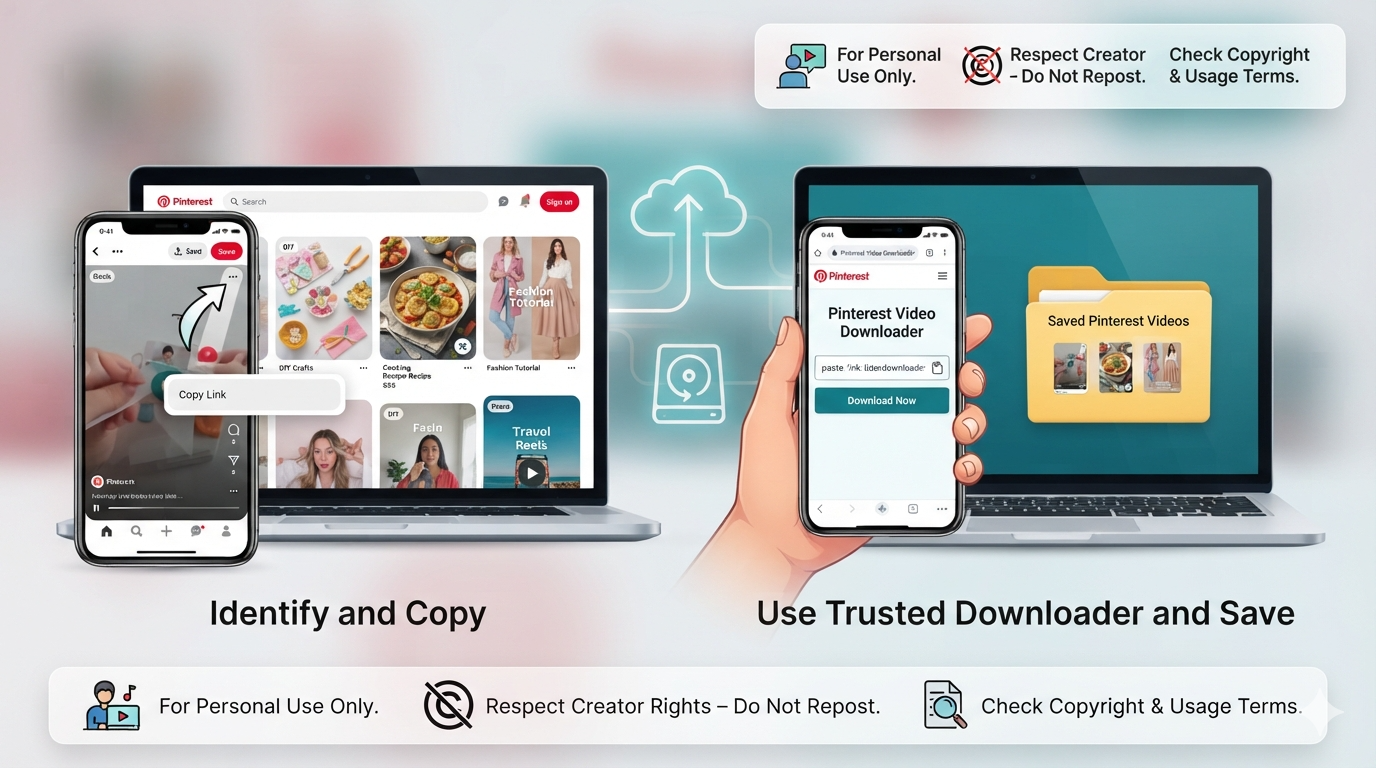
One common method involves copying the Pinterest video URL. First, open Pinterest and find the video you want to save. Open the Pin containing the video and look for the sharing option. Choose the option that lets you copy the link. The copied URL identifies the specific Pinterest post. You can then use a reputable online Pinterest video downloader. Paste the link into the downloader’s input box. Follow the instructions provided by that service. If a download option appears, select the available quality. Save the file to your device if the service supports it. This method is useful because it does not require complicated software. However, avoid websites that request unnecessary personal information. Never enter your Pinterest password into an unfamiliar downloader. A legitimate tool should not need your account password to process a public video URL. Check the website carefully before downloading anything.
How to Download Pinterest Reels on Android
Android users can save Pinterest videos through several practical methods. Start by opening the Pinterest app on your Android phone. Find the video you want to save and open its Pin. Tap the sharing button and choose the option to copy the link. Next, open your preferred browser and visit a trusted Pinterest video downloader. Paste the copied link into the provided field. If the service supports the video, download options should appear. Select a suitable video quality and save the file. The downloaded video may appear in your Downloads folder or browser downloads list. Some Android browsers also let you choose a specific storage location. Be careful with websites showing aggressive pop-ups or suspicious buttons. Do not install unknown applications simply because a website recommends them. A browser-based solution is often simpler. Before downloading, make sure you have enough storage space. Also remember that downloaded content should be used responsibly.
How to Download Pinterest Reels on iPhone
iPhone users can also save Pinterest videos with a simple link-based process. Open Pinterest using the official app and locate your chosen video. Tap the sharing option and copy the Pin’s URL. Then open Safari or another trusted browser. Visit a reliable Pinterest video downloader and paste the URL. Follow the site’s instructions to process the video. If a supported download option appears, select it. Safari may place downloaded files inside the Files app. You can usually find them under the Downloads folder. The exact location can vary based on your iPhone settings. Some websites may also open the video in a new browser tab. In that situation, follow the available save or download options. Avoid services that ask for your Apple ID or Pinterest password. You should never share sensitive login details with third-party download sites. Keep your iPhone updated and avoid suspicious downloads. These simple habits can make the process safer.
How to Download Pinterest Reels on a Computer
Desktop users have more screen space, which can make video saving easier. Open Pinterest through your preferred web browser. Search for the video you want to save. Open the Pin and copy its URL from the browser address bar. You can also use Pinterest’s sharing option to copy the link. Next, open a reputable Pinterest video downloader in another browser tab. Paste the copied URL into its search or download field. Wait for the website to process the link. If the video is supported, available download choices should appear. Select the option that matches your preferred quality. The file will usually appear in your computer’s Downloads folder. Before opening the downloaded file, check its extension and source. Avoid executable files when you only expect a video. A normal video should generally use a common media format. This simple check can reduce the chance of opening unwanted software.
Why People Want to Save Pinterest Videos
People save Pinterest videos for many different reasons. A useful video can provide inspiration for a future project. Someone might save a recipe to prepare later. Another person may keep a workout demonstration for offline reference. Students can save educational clips for personal study. Designers may collect visual ideas for mood boards and creative planning. These examples show why video saving can be convenient. However, saving a video does not automatically give you ownership. The original creator may still own the copyright. You should not remove watermarks or claim another person’s work as yours. Reposting content can also require permission. If you want to publish a saved video elsewhere, check the creator’s terms first. When possible, credit the original creator. Personal use and commercial use are very different. Understanding this difference helps you use downloaded Pinterest content responsibly. It also supports creators who spend time making useful videos.
Is a Pinterest Video Downloader Safe?
Safety should be an important part of how to download pinterest reels. Not every website offering downloads is trustworthy. Some sites may contain misleading advertisements or fake download buttons. Others may redirect visitors to unrelated pages. Before using a downloader, examine the website carefully. Avoid any service that asks for your Pinterest login information. You should also avoid downloading unknown software or browser extensions. A basic URL-based service usually does not need your account password. Keep your browser’s security features enabled while browsing. Do not click suspicious pop-ups or permission requests. You should also check whether your device has enough free storage. If a downloaded file has an unusual extension, do not open it immediately. Scan suspicious files with your security software. These steps are simple but useful. The safest approach is to use Pinterest’s own saving features whenever they meet your needs.
Pinterest Save Feature vs Video Downloading
Pinterest provides ways to save Pins inside your account. This option is different from downloading a video file. Saving a Pin keeps the content accessible through your Pinterest account. It does not necessarily create an offline video file on your device. This can be a better option when you simply want to find the content later. You can organize saved Pins into boards based on different interests. For example, you could create boards for recipes, travel, fashion, or home projects. Downloading is more useful when you need an actual video file. However, downloaded files take up device storage. They can also become outdated if the original creator changes the content. When deciding between the two options, think about your purpose. If you only need future access, saving the Pin may be enough. If you need offline viewing, a legitimate download method may be more convenient.
Common Problems When Downloading Pinterest Videos
Sometimes the download process may not work as expected. A downloader might say that the URL is unsupported. This can happen when the Pin is private, removed, restricted, or formatted differently. The website may also be temporarily unavailable. First, check whether the Pinterest video still plays normally. Then copy the URL again and try processing it. Make sure you copied the complete link. You can also try another trusted browser. Clearing an outdated browser cache may sometimes help. If a third-party service repeatedly fails, consider using Pinterest’s built-in save feature instead. Avoid using random websites simply because the first option does not work. Some services can display misleading messages to encourage additional downloads. Your main goal should be safe and simple access. If a video belongs to another creator, remember that technical availability does not mean unrestricted reuse. Copyright rules can still apply even when a video is publicly visible.
How to Choose the Right Video Quality
Video quality matters when you save Pinterest content. Higher resolution usually creates a clearer image. However, high-quality files also require more storage space. A smaller video may be better for phones with limited storage. Think about where you plan to watch the video. A small screen may not require the highest available resolution. For larger displays, higher quality can provide a better viewing experience. Some Pinterest video downloaders offer multiple quality choices. If several options appear, choose a reasonable balance between quality and file size. You should also consider your internet connection. Large files can take longer to download. Avoid services that claim to provide impossible quality improvements. A downloader cannot magically create original detail that does not exist. The best choice is usually the highest genuine quality available from the source. This approach gives you a useful video without wasting storage or bandwidth.
Tips for a Better Pinterest Video Download Experience
A few simple habits can make how to download pinterest reels much easier. Start by using a stable internet connection. Copy the video URL carefully before opening a downloader. Keep your browser updated to reduce security problems. Avoid clicking multiple download buttons on advertising-heavy websites. Look for the actual video download option instead. Check the downloaded file before sharing or opening it. Organize saved videos into folders if you download many files. You can create folders for recipes, tutorials, travel, and other topics. Delete files you no longer need to free up storage. Most importantly, remember why the video was created. Creators invest time and effort into their work. Downloading a video for private reference is different from publishing it again. If you want to use the content commercially, seek permission first. These simple practices make your workflow cleaner and more responsible.
Can You Download Pinterest Videos Without an App?
Yes, in many cases, you can save Pinterest videos without installing an additional app. A browser-based approach can be convenient on phones and computers. You usually need the URL of the public Pinterest video. After copying the link, you can use a compatible online video downloader. This method saves you from installing unknown applications. It can also reduce the number of apps using your device storage. However, browser-based services vary in quality and safety. Some may contain aggressive advertising or misleading buttons. Always check the page before interacting with it. Do not download an application simply because a website displays a warning. You should also avoid entering private account information into third-party tools. If a website cannot process your link, try Pinterest’s built-in saving feature. The simplest method is often the best one. Your goal should be convenient access without creating unnecessary security or privacy risks.
Copyright and Responsible Use of Pinterest Videos
Knowing how to download pinterest reels is only part of the process. You should also understand responsible content use. Pinterest hosts content created by many different people and businesses. Those creators may have copyright protection over their videos. Downloading a video does not transfer those rights to you. You should not automatically repost, sell, or modify someone else’s work. If you want to use a video for business, contact the creator first. Ask whether they allow the planned use. Keep attribution when appropriate and follow any stated licensing conditions. Educational or personal use may have different considerations depending on your location. Copyright laws can also vary between countries. When in doubt, use content that you created yourself. You can also look for videos released under suitable licenses. Responsible downloading helps protect creators and reduces potential disputes. It also makes your content strategy more trustworthy and professional.
Frequently Asked Questions
Can I download any Pinterest Reel?
Not every Pinterest video can necessarily be downloaded. Some content may be private, restricted, removed, or unsupported by third-party tools. Public videos are generally easier to process. Always check the content’s usage rights before reusing it.
Is a Pinterest video downloader free?
Many online Pinterest video downloaders offer basic downloading without payment. However, features and limitations vary between services. Be careful with websites that request payment or personal information unexpectedly. Always review the service before using it.
Can I download Pinterest videos on my phone?
Yes, you can often use a mobile browser to save supported Pinterest videos. Copy the Pin’s URL and use a compatible browser-based downloader. Your phone’s Downloads folder or Files app may store the resulting video.
Do I need to install an app?
No. You can often use a browser-based method instead. This can be more convenient because you do not need additional software. Avoid installing unknown apps from unfamiliar websites.
Why does my Pinterest video link not work?
The video may be private, removed, restricted, or unsupported. The downloader could also be temporarily unavailable. Try copying the link again or use Pinterest’s built-in save option.
Can I repost downloaded Pinterest videos?
Downloading does not automatically give you permission to repost a video. The original creator may own copyright over the content. Ask for permission before using someone else’s video commercially or publicly.
Conclusion
Learning how to download pinterest reels can be useful when you want offline access to helpful videos. The process is usually simple when the video is public and supported. You can copy the Pin URL and use a suitable browser-based downloader. You can also use Pinterest’s own save feature when offline downloading is unnecessary. Always focus on safety when using third-party websites. Never share your Pinterest password with an unknown service. Avoid suspicious files, pop-ups, and unnecessary applications. Most importantly, respect the creator behind every video you save. A downloaded file does not automatically give you publishing rights. Use saved videos for appropriate personal purposes unless you have permission for broader use. With the right approach, saving useful Pinterest content can be convenient and responsible. Take a moment to check the source, choose a suitable quality, and keep your saved files organized.